Pages

Showing posts with label Facebook. Show all posts

Wednesday, June 8, 2011

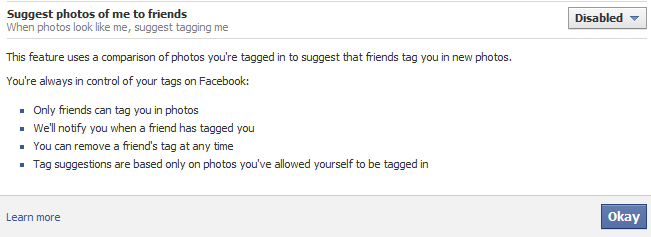
Can You Disable Facebook Facial Recognition?


The answer is simple, YES you can. Facebook has a new facial recognition feature that will find pictures of you by using your face and recommend to your friends that they tag you in that photo. Basically any picture of you on Facebook can be tracked and pointed out to your friends. I personally do not need EVERYONE I know seeing EVERY picture of me on Facebook ever. Luckily we can disable this feature with a few easy mouse clicks. This will force friends to manually tag your pictures versus Facebook automatically suggesting pictures for people. Common are we getting that lazy that we can't search for pictures and manually click TAG?

1. Open your Privacy Settings
2. Click Customize Settings (it is towards the bottom)
3. Scroll down to the "Suggest Photos of Me to Friends"
4. Click Edit Settings
5. From the drop down box click disable


Done and done.

Remember it is a good idea to take a spin through the Privacy Settings every so often to see what else Facebook has snuck in under the "Radar."

Tuesday, January 25, 2011

Facebook is Up to Some Naughty Shenanigans


All i can say is that this is bad. Datronacon brought this to my attention a short while ago, I then read it, and am passing it on to you. Just think about what you "like" on websites or on Facebook. This is a new ad feature that appears to remove alot of privacy and freedom from the user to pad the pockets of companies that would use this "service." They call these sponsored stories. Basically if you were to "like" something from a vendor the example in the article was Starbucks then an ad shows up as a sponsored story and on your wall as if you typed it yourself. You can say ADS CAN SUCK IT and the post will say Omnivox says ADS CAN SUCK IT at Starbucks. To add insult to injury if someone wrote something negative about a product (as it is free to do) the vendor can delete that "sponsored"story so they don't look bad. The user has NO control and this simply will not do.

Irina states, "The unit will give brand-related action such as a "like" or a check-in a lot more visibility on Facebook by adding them to an ad unit in addition to users' news feeds.

For example, if Starbucks buys a "sponsored story" ad, the status of a user's friends who check into or "like" Starbucks will run twice: once in the user's news feed, and again as a paid ad for Starbucks. Though clearly marked with the words "sponsored story," the ad -- which will includes a user's name, just like the news feed -- is not optional for Facebook users."

and

"The way that the product is today, a check-in post will show up in the ad feed exactly as the user wrote it. So if a user checks into Starbucks with a "I hate this place, but it's the only coffee around" then that's exactly what the "ad" turns out to be.

Facebook is aware of this possibility, because people will be people, and it has left a "flag" button for "inappropriate content." Advertisers that don't want to take the chance of having negative sponsored stories pop up about them can limit their buys to likes. "As a marketer, you can say that I'm only going to do 'like' stories, since there is no way to change that," said Facebook marketing lead Jim Squire. "So you can figure out which is the best option for your organization.""


Please follow the link to adage.com to read more. I feel this is important for everyone to see and understand.

Wednesday, December 15, 2010

Want To Stop Those Pesky Tracking Cookies?


Recently it came to our attention that Facebook has been using tracking cookies that, well, track your web activity (it has been known for some time that FB has AD tracking). Any site that has a "like" icon for Facebook sharing will create a cookie in your browser and track that activity whether or not you have a Facebook account. It is no secret that cookies are created by first and third party websites in your browser. The difference is that the Facebook Beacon Ad system will keep an eye on your surfing whether you are logged in to Facebook or not. An article at the NYTimes states, "Cookies are used to store information about a user or computer’s Web use so sites can customize that user’s experience, including what ads they see. So-called persistent or tracking cookies are data placed not by the site visited, but by other third-party Web sites that have placed content or advertising on the visited Web page. These types of cookies can stay on computers for long periods of time and gather data about surfing habits, and have long raised hackles among those concerned about privacy online." Browsers have fought the cookie war for some time. In fact you can even disable cookies on your browser, but this may effect your surfing experience causing some websites to not work properly.
This is where Disconnect comes in. Disconnect allows users to browse with some privacy again. There is one caveat, it is only supported in Chrome or Rockmelt at this time. An excerpt from the Chrome Extensions page states;

Disable tracking by third parties like Digg, Facebook, Google, Twitter, and Yahoo, without requiring any setup or significantly degrading the usability of the web.
• Truly depersonalize searches on search engines like Google and Yahoo (by bl
ocking identifying cookies not just changing the appearance of results pages), while staying logged into other services — e.g., so you can search anonymously on Google and access iGoogle at once.
• See how many resource and cookie requests are blocked, in real time.
• Easily unblock services, by clicking the toolbar button then services (and reloading current pages) — e.g., so you can play games on Facebook.

So, if you use Chrome or Rockmelt give this extension a whirl. I have i installed and
it works like a charm. Follow the link to the Chrome Extension on page and click Install. After Disconnect has been installed you can see it working by clicking the Disconnect icon on the upper right tool bar in Chrome. A list of blocked cookies per website will pop up, to disable the filtering of one site or another just click the name in the list. Click the name of the unblocked site again to resume filtering.