Pages

Saturday, August 27, 2011

How to open an archive or personal folder in Outlook 2003

How to open an archive or personal folder in Outlook 2003


Click the “File” menu:


Then hover your mouse pointer over the “Open” menu item:


Then click on “Outlook Data File...”


When the window appears you should already be in your “Outlook” folder:


In the main section of the window there should be a file named “archive”.  If you have extensions turned on then there will be a “.pst” after the file name.  You may also have a file named “Personal Folders”.


Highlight the file by clicking once with the left mouse button and then click on the “OK” button:


On the left side of your “Microsoft Outlook” window you should see a new “Archive Folders” icon with a plus sign next to it:


Click the plus sign to expand the folders within the archive:


The folders you see are dependent on the setting for your email archiving.  Click on each folder to start browsing the information held within.

Wednesday, June 8, 2011

Can You Disable Facebook Facial Recognition?


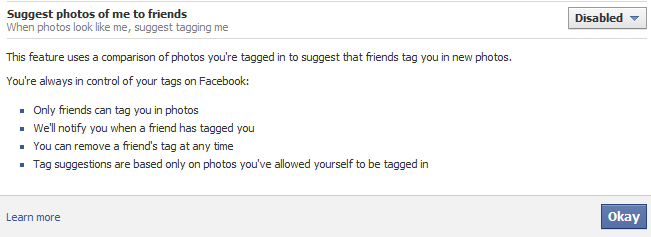
The answer is simple, YES you can. Facebook has a new facial recognition feature that will find pictures of you by using your face and recommend to your friends that they tag you in that photo. Basically any picture of you on Facebook can be tracked and pointed out to your friends. I personally do not need EVERYONE I know seeing EVERY picture of me on Facebook ever. Luckily we can disable this feature with a few easy mouse clicks. This will force friends to manually tag your pictures versus Facebook automatically suggesting pictures for people. Common are we getting that lazy that we can't search for pictures and manually click TAG?

1. Open your Privacy Settings
2. Click Customize Settings (it is towards the bottom)
3. Scroll down to the "Suggest Photos of Me to Friends"
4. Click Edit Settings
5. From the drop down box click disable


Done and done.

Remember it is a good idea to take a spin through the Privacy Settings every so often to see what else Facebook has snuck in under the "Radar."

Tuesday, June 7, 2011

iOS 5 Preview at Engadget


Here is a link to an Engadget post regarding the iOS 5 preview for iPhone and iPad. I am a little busy today so I will not do my own write up with gleaned information.

iOS Preview

You will notice its cloud features that tie into the new and coming OS X Lion. Also, there appears to be additional multitasking features and notification features that were previously lacking.

Monday, June 6, 2011

Microsoft System Sweeper


Have you ever had a PC so infected it would not boot? Perhaps this machine is so infected that scanning from within Windows, or even, Safe Mode will not succeed. We in IT have all tried various scanning utilities to get a PC to boot from outside of Windows. Well it seems that Microsoft is taking their AV tools a step further than their rather GOOD Security Essentials and giving us an easy solution.

I introduce you to System Sweeper Beta from Microsoft. This tool creates a bootable CD, DVD, or USB media that you can load into the machine. From there you can boot to this utility and do a malware scan while Windows lies dormant. Currently this tool is in Beta and comes in both a 32 bit and 64 bit flavor. System Sweeper is OS agnostic, but does have to match the OS architecture.